Locker Design Creative Game

Locker Design Creative Game

Developer: Clay Studio
Published: 2025-02-15
Updated: 2026-06-12

What players say

DIY Locker offers a calm and creative experience. The controls are easy to learn, and the variety of stickers and accessories keeps the game fresh. Players can design many different lockers, each with its own theme. It encourages creativity without pressure. The game is safe for children and provides a positive, screen-based activity. Replay value is high because you can always try new combinations. Overall, it is a well-made game for families.

How to play

Game Introduction

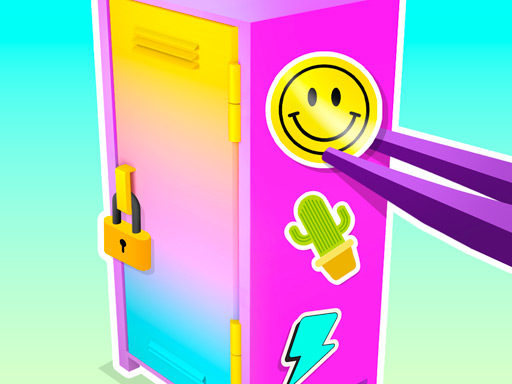
DIY Locker Design Game - Creative Game is a relaxing and imaginative activity where players can personalize their own locker from scratch. Starting with a plain locker, you have the freedom to transform it using a variety of decorative tools. The core objective is to express your personal style through color, pattern, and accessory choices. This game is designed for kids and families who enjoy art and design, offering a safe and easy-to-use environment for creative expression. What makes it unique is the focus on a simple everyday object—the locker—turning it into a canvas for endless creativity.

How to Play

To begin, select a locker from the available options. Next, choose a background that sets the overall mood—options may include bright colors or soft patterns. Then, add stickers featuring designs like animals, stars, sports, or flowers. After that, place accessories such as shelves, hooks, and other decorative items. You can arrange everything by dragging and dropping items to your preferred positions. Experiment with different combinations until you are satisfied with the look. Once finished, save your design and share it with friends. The controls are simple and intuitive, making the game accessible for all ages.

Game Features

Customizable backgrounds, stickers, and accessories allow for a wide range of personalization. The game offers endless creative possibilities within a family-friendly, safe environment. Easy drag-and-drop controls make it simple for anyone to play. Players can save their completed locker designs and share them with others. The game is designed to be relaxing and suitable for both short breaks and longer play sessions. It encourages artistic expression without any pressure or time limits.

Tips for Success

Start by choosing a background that matches the mood you want to create—bright colors for a cheerful look or soft patterns for a calm feel. Experiment with different sticker combinations to find a theme you like, such as nature, sports, or whimsical designs. Use accessories like shelves and hooks to add depth and functionality to your locker. Don’t be afraid to rearrange items multiple times until everything feels balanced. Save your favorite designs to look back on and share for inspiration. Most importantly, have fun and let your creativity guide you.
Compatibility

✅ This game supports:
- Desktop browsers (Chrome, Edge, Safari)
- Mobile browsers (Chrome on Android, Safari on iOS)
❌ Does NOT support: - Internet Explorer - Very old browser versions
👉 Try refreshing or updating your browser
FAQ
Is this game free to play?
Based on typical games in this creative genre, the game may be free to play with optional in-app purchases for additional stickers or accessories. However, the exact pricing model is not specified in the available information. It is best to check the game's official page for details.
Can I play this game on my mobile device?
Many creative design games are available on mobile platforms like smartphones and tablets. While the input does not specify supported devices, this type of game is often optimized for touch controls. You may want to verify compatibility with your device before playing.
Are there any in-app purchases or ads?
The available information does not mention in-app purchases or advertisements. However, many free creative games include optional purchases for extra content or display ads. For accurate details, please review the game's official description or privacy policy.
How do I share my locker design with friends?
The game includes a save and share feature that allows you to export your completed locker design. Typically, you can share it via social media, messaging apps, or email. The exact sharing options may vary, so look for a share button within the game's interface.
What age group is this game suitable for?
The game is described as family-friendly and safe for all ages, making it suitable for kids, teens, and adults. It is designed to be easy to play, with simple drag-and-drop controls that younger children can manage. Parents can feel comfortable letting their children play independently.
Can I undo changes or start over on a locker design?
While not explicitly stated, many creative design games include an undo or reset option to help you experiment freely. If such a feature is available, you can typically find it in the game's menu or toolbar. This allows you to try different combinations without worry.
Advertisement

Related Titles

Fashion Magazine Dress Up Game

Fashion Magazine Dress Up Game

Spooky Makeup Celebrity Style

Spooky Makeup Celebrity Style

Bella Braid Hair Salon Game

Bella Braid Hair Salon Game

Spider Girl Dress Up Fashion Game

Spider Girl Dress Up Fashion Game

Annie's Fashion Dress Up

Annie's Fashion Dress Up

Babysitter Daycare Baby Care

Babysitter Daycare Baby Care

Pretty Cure 2 Dress Up Fun

Pretty Cure 2 Dress Up Fun

Princesses Community Help Game

Princesses Community Help Game

Fashion Up: Dress Up Style Game

Fashion Up: Dress Up Style Game

Christmas Dress Up Selfie Game

Christmas Dress Up Selfie Game