Apple and Onion's Balance Ride
Reviews
Apple and Onion's Balance Ride stands out for its clever use of physics to create a learning experience that feels like play. The colorful courses and friendly characters keep children engaged, while the checkpoint system prevents discouragement. It is an excellent choice for parents looking for a safe, educational online activity that builds focus and motor skills without pressure.
Description
Course Design and Visual Style
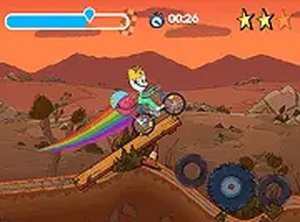
The tracks in this game are built with vivid colors and playful shapes, creating an inviting world for players of all ages. Each course presents a series of gentle hills, curves, and flat stretches that require careful handling. The visual design keeps the focus on the characters and the path ahead, with minimal distractions so players can concentrate on maintaining their balance. The cheerful atmosphere supports a relaxed yet engaging experience.
Physics and Bike Control
The core of the gameplay revolves around a simple physics system that simulates real bicycle balance. Players tilt the bike forward to gain speed and lean back to slow down or steady themselves on uneven surfaces. The challenge lies in making small, precise adjustments rather than large movements, as overcorrecting can lead to tipping. This mechanic teaches patience and fine motor control, making each successful run feel earned.
Collectibles and Progress Markers
Scattered across each course are shiny stars that add to the player's score. Flag checkpoints appear at key points, recording progress so players can resume from the last flag if they lose balance. This system encourages persistence without frustration, as players can see their improvement over time. The combination of stars and flags gives clear short-term goals while the overall objective is to complete the course.
Accessibility and Device Compatibility
The game runs directly in a web browser, requiring no downloads or installations. It works smoothly on both desktop computers and mobile devices, with touchscreen controls available alongside keyboard inputs. This flexibility means players can enjoy the game on a variety of devices without any setup. The simple interface and clear feedback make it easy for young children to understand while still offering enough depth for older players.
Family-Friendly Design Philosophy
This game is built around positive, non-competitive play. There are no timers, leaderboards, or failure states that punish mistakes. Instead, players are encouraged to try again after a tip-over, learning from each attempt. The friendly characters and upbeat music create a supportive environment that promotes focus and hand-eye coordination. It is an ideal choice for parents seeking a safe, engaging activity for their children.